

Instructions for conducting Functional Skills assessments (English and Mathematics)
This guidance is intended for schools, colleges, training providers and employers conducting paper-based and/or on-screen Level 1 and Level 2 Functional Skills assessments (English and Mathematics). Both the head of centre and the exams officer must familiarise themselves with the entire contents of this guidance.
The full Instructions for conducting Functional Skills assessments (English and Mathematics) document can viewed in multiple formats.
Introduction
This guidance must be read in conjunction with the current version of the JCQ Instructions for conducting examinations (ICE) guidance and any awarding body specific documentation. Where there are differences between ‘ICE’ and this document, the instructions in this document will prevail.
This guidance is intended for schools, colleges, training providers and employers conducting paper-based and/or on-screen Level 1 and Level 2 Functional Skills assessments (English and Mathematics). Both the head of centre and the exams officer must familiarise themselves with the entire contents of this guidance.
For information about registration, entry and certification processes, centres should consult awarding body documentation.
Each centre must have a designated manager who is responsible for system security, the quality of provision and resources within the centre.
All centres running Level 1 and Level 2 Functional Skills qualifications must be approved by the relevant awarding body. Centres must have an official email address. Personal email addresses such as Yahoo, Hotmail and Gmail are not acceptable. Emergency contact details must also be provided, which may be a mobile telephone number or a personal email address.
Awarding bodies reserve the right to conduct audits to ensure assessments are being administered correctly. Audits for paper-based assessments will be unannounced. For on-screen assessments, centres will be given advance notification of a potential audit1.
Centres must ensure that the JCQ Information for candidates documents (on-screen tests, social media and written examinations) are distributed to all candidates, either electronically or in hardcopy format, prior to the assessments taking place. These documents may be found at:
https://www.jcq.org.uk/exams-office/information-for-candidates-documents
1. CENTRE ROLES AND RESPONSIBILITIES
Examinations officer
1.1 The examinations officer is responsible for:
- the safe and secure storage of all assessments;
- allocating invigilators; and,
- managing the security arrangements following receipt and completion of the assessments.
Head of centre/test manager
1.2 The head, principal or chief officer of a centre, approved by the awarding body, is defined for the purposes of this document as the ‘head of centre’.
The head of centre is the individual who is accountable to the awarding bodies for ensuring that the centre is always compliant with the published JCQ regulations and awarding body requirements to ensure the security and integrity of the assessments.
Quality nominee
1.3 The quality nominee must ensure that:
- suitably qualified and experienced adults invigilate the assessments; and,
- appropriate arrangements are in place to enable invigilators to carry out adequate checks on the identity of all candidates.
Tutor
1.4 Anyone familiar with the Functional Skills subject content and the awarding body’s specification, who uses these to prepare candidates for assessments, is classed as a ‘tutor’. A tutor may also be described as an assessor, a lecturer, a supervisor, a teacher or a trainer.
This will include anyone involved in the following activities:
- preparing and delivering Functional Skills learning;
- conducting formative assessment, including the use of Functional Skills sample tests;
- providing feedback on candidate progress;
- providing guidance to candidates on how to attempt questions in Functional Skills assessments;
- making decisions about a candidate’s readiness for Functional Skills assessments; and,
- carrying out internal quality assurance for Functional Skills qualifications.
Chapter 1 – General instructions for paper-based and on-screen Functional Skills assessments
2. ADMINISTRATION OF ASSESSMENT
2.1 A tutor of a Functional Skills qualification must not be involved in the administration of the assessment materials for Level 1 and Level 2 assessments in that subject, regardless of the level they teach.
- For paper-based assessments, ‘administration’ includes registration, secure storage, initial receipt of confidential materials, movement and preparation of materials for scheduled assessments and the return of materials to the awarding body after the scheduled assessments have been conducted.
- For on-screen assessments, the tests are locked down until the time a candidate starts their test. Once completed, the test is inaccessible. Advice must be sought from the relevant awarding body if a tutor is the only person available to undertake any of the administration activities.
3. INVIGILATION OF ASSESSMENTS
3.1 Invigilators are responsible for conducting the assessment in the presence of the candidates.
3.2 The head of centre must ensure that invigilators are suitably qualified and experienced adults. Whilst the head of centre has discretion to decide who is suitably qualified and experienced, any friend, relative or peer of a candidate in the assessment room must not be the sole invigilator.
3.3 Staff who have combined vocational and Functional Skills tutor roles must not invigilate if their tutor role covers the activities detailed in paragraph 1.4.
3.4 Many learning programmes incorporate the development of English and maths skills. Some staff are involved in the teaching and learning process but are not directly engaged in delivering content for, or preparing candidates for, Functional Skills assessments.
The following staff may invigilate:
- staff who solely carry out initial and diagnostic assessments;
- staff who direct candidates to online and/or e-learning programmes, who set up online and/or e-learning programmes for candidates and/or support candidates to access e-learning;
- vocational staff who incorporate English and maths into lessons where they occur in vocational programmes, but are not responsible for preparing candidates for Functional Skills assessments; and,
- staff who administer Functional Skills assessments.
The following staff must not invigilate:
- staff who directly support candidates working towards Functional Skills assessments, even if they are not the candidates’ main Functional Skills tutor;
- staff supporting candidates using online/e-learning programmes, where these include Functional Skills assessment preparation.
What are the invigilation rules for Functional Skills English assessments?
- A Functional Skills Mathematics tutor may invigilate a Functional Skills English assessment.
- Staff who teach GCSE English Language, but not Functional Skills English, may invigilate.
- Staff who teach ESOL, but do not teach Functional Skills English, may invigilate.
- An employer may invigilate a Functional Skills English assessment.
- A Functional Skills English tutor must not invigilate a Functional Skills English assessment.
- A Functional Skills English and Mathematics tutor must not invigilate a Functional Skills English assessment.
What are the invigilation rules for Functional Skills Mathematics assessments?
- A Functional Skills English tutor may invigilate a Functional Skills Mathematics assessment.
- Staff who teach GCSE Mathematics, but not Functional Skills Mathematics, may invigilate.
- An employer may invigilate a Functional Skills Mathematics assessment.
- A Functional Skills Mathematics tutor must not invigilate a Functional Skills Mathematics assessment.
- A Functional Skills English and Mathematics tutor must not invigilate a Functional Skills Mathematics assessment.
3.5 A centre must ensure that it has suitable invigilators available for all Level 1 and Level 2 Functional Skills assessments.
There are no automatic exceptions to this rule.
- In exceptional circumstances, where only a tutor can access the assessment location and/or the candidates, an adjustment may be granted by prior arrangement with, and at the discretion of, the awarding body. These exceptional circumstances may include:
- restrictions within the centre on the grounds of security or safeguarding; or,
- the remote location of the candidate’s workplace/assessment location; or,
- a reasonable adjustment for an individual candidate.
Any exception on these grounds must be agreed by the awarding body in advance of the assessment date. An exception may also require the centre to agree to additional measures to ensure the security of the assessment materials and additional monitoring by the awarding body.
3.6 Invigilators must give their whole attention to the proper conduct of the assessment. Invigilators must not perform any additional task (e.g. marking) in the assessment room.
3.7 Sufficient invigilators must be appointed to ensure that the assessment is conducted in accordance with the following requirements:
- at least one invigilator must be present for every 30 candidates;
- invigilators may be changed during the assessment, provided that the number present in the assessment room does not fall below the prescribed number;
- when only one invigilator is present, they must be able to summon assistance easily, without leaving the room and without disturbing the candidates; and,
- an invigilator must be able to observe every candidate in the room at all times.
3.8 The following documents must be available to every invigilator in the assessment room:
- JCQ Instructions for conducting Functional Skills assessments;
- JCQ Instructions for conducting examinations; and,
- any awarding body subject-specific documentation.
3.9 The current JCQ Warning to Candidates and Unauthorised items posters must be displayed outside the assessment room. These posters can be found in Appendices 1 and 2.
3.10 Display materials (e.g. diagrams, wall charts) that might assist candidates in answering questions must be removed, unless the question paper rubric states that candidates are allowed to use reference materials. Particular care must be taken with assessments which are held in computer rooms/suites, laboratories or libraries.
3.11 Possession of unauthorised items is an infringement of the regulations and could result in disqualification from the assessment. Unauthorised materials, in particular mobile phones, regardless of whether they are switched on or off or within reach, must not be in candidates’ possession.
3.12 An invigilator must not:
- re-phrase a question for a candidate;
- explain any subject-specific or technical terms to a candidate; or,
- give any indication of the time elapsed or remaining where a question paper consists of distinct sections.
4. SEATING PLANS
4.1 A seating plan is required for every assessment even if there is just one candidate present. The seating plan must clearly show how candidates were seated during the assessment and provide an accurate record of how the assessment room was set up.
This is to ensure:
- the assessment is being conducted as per the published regulations;
- invigilation is not intrusive; and,
- the candidate has appropriate space to complete the assessment.
4.2 Centres must keep signed records of the seating plan and invigilation arrangements for each assessment session for three months after the date of the assessment. Awarding bodies may request these records at any time during that three-month period for the purpose of enquiries about results, appeals or investigations.
5. IDENTIFICATION OF CANDIDATES
5.1 Centres must check the identity of candidates at enrolment and record the item(s) of identification seen.
It is the centre’s responsibility to check candidate identity and confirm that candidates have taken the correct assessments. To ensure this:
- for written assessments, invigilators must check the identity of each candidate and record the evidence of candidate ID.
- for on-screen assessments, the invigilator must check the identity of each candidate to ensure that the correct ID and password/keycode are issued.
5.2 A candidate who is not known to the centre must present photographic documentary evidence that they are the same person who was entered for the assessment. This check must take place before each assessment session.
Appropriate photographic evidence would include, for example, a valid passport, a national ID card or a photo card driving licence.
5.3 If a candidate sits an assessment in another candidate’s name, whether it is intentional or not, this may constitute malpractice and must be reported to the awarding body immediately.
6. THE PEOPLE PRESENT
6.1 Only candidates taking the assessment(s) and persons authorised by the head of centre are allowed in the assessment room.
An awarding body reserves the right to visit centres at any time to inspect the arrangements made for the security of confidential assessment material and the conducting of the assessments.
7. SUPERVISION OF CANDIDATES
7.1 Invigilators must supervise the candidates throughout the whole time the assessment is in progress and give their complete attention to this requirement at all times.
8. CANDIDATES WITH DISABILITIES AND LEARNING DIFFICULTIES
8.1 Centres should refer to the relevant awarding body’s website for information about the available access arrangements and/or reasonable adjustments for the assessment and the processing arrangements.
9. MALPRACTICE
9.1 Functional Skills assessments rely on the integrity of the candidates. Where malpractice occurs, or is thought to have occurred, this will be investigated by the awarding body. This may lead to candidates having their result withheld.
9.2 The head of centre must ensure that all cases of alleged, suspected or actual candidate malpractice or any infringement of the regulations are reported to the awarding body without delay. Further guidance will then be provided by the awarding body’s Malpractice Team.
Centres should provide as much information as possible, including:
- full details of the incident;
- names and roles of individuals involved; and,
- signed statements.
Specific content or photographs of a live assessment must not be provided to the awarding body.
Any infringement of the regulations may lead to the disqualification of the candidate. The decision to disqualify a candidate rests solely with the awarding body.
9.3 The invigilator should remove and retain any unauthorised material discovered in the candidate’s possession and make a note of the circumstances.
9.4 The head of centre may remove a candidate from the assessment room. However, this should only occur if it considered essential or if the continued presence of the candidate would cause disruption to others in the room.
Chapter 2 – Paper-based, on-demand Functional Skills English and Mathematics assessments
10. KEEPING PAPER-BASED, ON-DEMAND FUNCTIONAL SKILLS ENGLISH AND MATHEMATICS ASSESSMENTS SECURE
10.1 These assessments are offered on-demand throughout the year. The standard Instructions for conducting Functional Skills assessments apply.
10.2 The centre must:
- on receipt of question paper packets, check the contents of each packet by reading the title through the packet window. The awarding body must be contacted immediately if a packet has been damaged in transit, the seal has been broken or incorrect question papers have been delivered;
- store all question papers securely, in line with the instructions in paragraphs 10.4–10.8 (below); and,
- store securely the question papers and the source documents/text booklets (which may be an insert) for the Level 2 Functional Skills English Reading assessment.
10.3 The centre must not:
- photocopy question papers unless authorised by the awarding body;
- publish information relating to the content of the assessments unless authorised by the awarding body; and,
- open question paper packets until the time of the assessment.
Secure storage facilities
10.4 Centres running paper-based, on-demand assessments must have the following secure storage facilities, outlined in paragraph 10.7 below. Centre approval may be withdrawn if the secure storage facility is found to be unacceptable.
10.5 The examinations officer, or quality nominee, must ensure that the assessment materials are locked away in a place of high security. The number of key holders must be restricted to between two and six people.
Only the examinations officer or key holders, as authorised by the head of centre, must have access to the live assessment materials prior to the scheduled assessment time.
10.6 The examinations officer must:
- ensure that envelopes and boxes containing confidential materials are signed for;
- keep a log, ideally at reception, recording the delivery of confidential materials and showing each question paper delivery and the number of boxes received;
- keep a record of when and who accesses the question papers while in secure storage;
- keep question papers safe and secure prior to the assessment dates;
- make question papers available to invigilators and candidates at the appropriate time;
- be able to demonstrate that the appropriate security systems are in place to prevent unauthorised access to the assessment materials;
- make appropriate arrangements to ensure that confidential assessment materials are delivered only to those authorised to receive them; and,
- maintain the confidentiality of candidate details and candidate responses.
10.7 Centres must not store any live question papers on computers. All question papers are considered ‘live’ until the awarding body releases them as practice papers. Question papers must be stored in a safe or a cabinet in a securely locked room conforming to the secure storage requirements below.
| REQUIREMENT | RECOMMENDATION |
|
Strong safe or security cabinet or metal cabinet with locking bar. Two to six key holders only, who will either be part of the exams team or senior leaders. | Bolted to wall or floor. |
|
Secure room in a fixed building, e.g. not a portable cabin or portable building. Walls, ceiling and floor of strong, solid construction. | Preferably on an upper floor with no windows. |
|
Solid door. Strong, secure hinges. Security lock, e.g. a minimum of a 5-lever mortice lock or coded keypad lock or electronic security lock. There must be at least two keys rather than one key accessed by two or more members of staff. Centres must not keep a spare set of keys anywhere where they can be accessed by members of staff who are not involved in exam administration. This includes in a cabinet or safe. Keys must either be kept on the key holder’s person or in a coded key safe (securely attached to the wall) which is only accessible to the designated key holders. |
Please see section 3 of the JCQ document Instructions for conducting examinations for the full list of the requirements and conditions for storing confidential awarding body material.
10.8 The awarding body must be informed immediately if the security of the question papers has been put at risk by fire, theft, loss, damage, unauthorised disclosure or any other circumstances.
Transporting question papers to offsite assessment venues
10.9 Question papers are despatched to the approved centre through which the original entries were made. The centre must have storage facilities that meet the secure storage requirements.
10.10 Question paper packets must not be opened prior to the assessment window set by the awarding body.
10.11 Centres with multiple sites or assessment venues are allowed to split question paper packets for transportation to alternative locations.
10.12 If a centre wishes to conduct an assessment at a location other than the approved centre address to which question papers are sent, the following requirements must be met:
- question paper packets are transported on the day of the assessment;
- the rearranged packages are despatched using a trackable secure courier, or by centre staff, to the assessment venue for collection by the invigilator;
- question paper packets must be transported in a lockable case which must not be left unattended at any time. It is the responsibility of the invigilator to ensure that the question paper packets in their possession are kept securely until the time of the assessment;
- question paper packets must be signed for at the alternative assessment location and stored according to the secure storage requirements;
- the centre must keep a transport log which records the following information:
- the names of all people handling the question papers;
- the time when question papers were removed from secure storage at each location;
- the means of transportation and the security measures taken;
- the time of arrival at each location;
- the secure storage arrangements at each approved location; and,
- the tracking number log when a courier delivery method has been used.
- where the awarding body allows centres to reschedule the assessment within a window, the question papers must remain in secure storage at the centre until the start of the assessment window;
- in exceptional circumstances, question paper packets may be despatched before the day of the assessment by either:
- post, using recorded delivery; or
- using a secure courier (where the package is signed for).
- question paper packets can only be stored overnight if the site has a secure storage facility which meets the requirements of this document. If the site does not have a secure storage facility, the assessment can still be conducted at this address, but the question paper packets will need to be securely transported to and from the venue on the day of the assessment. Assessment materials must not be stored away from the centre for more than one day.
Conditions for splitting question paper packets for use at different centre sites
10.13 Centres with multiple sites may split and reseal question paper packets within the assessment window set by the awarding body. The following requirements must be met:
- question paper packets should only be opened if absolutely necessary;
- question paper packets must be opened in a secure environment, e.g. a private room or an office with restricted access;
- only appropriate centre administrative staff may have access to the question papers whilst they are being repackaged;
- once the question papers are appropriately repackaged for each assessment site, they must be resealed and stored according to the secure storage requirements; and,
- newly sealed envelopes must not be reopened until the time of the scheduled assessment.
Conditions for splitting question paper packets for use in multiple rooms within a centre
10.14 Centres with multiple assessment rooms on-site are allowed to split question paper packets to facilitate the setting up of these rooms. Question paper packets must only be opened where absolutely necessary. The following requirements must be met
- question paper packets must be split and resealed no earlier than two working days in advance of the assessment date;
- only appropriate centre administrative staff must have access to the question papers whilst they are being repackaged;
- question paper packets must be opened in a secure environment, e.g. a private room or an office with restricted access;
- once question papers are appropriately repackaged for each assessment room, they must be resealed and stored according to the secure storage requirements. The newly sealed envelopes must not be reopened until the time of the scheduled assessment; and,
- a log is kept which records the following information:
- names of all people handling the papers;
- the time when the question paper packets were removed from secure storage;
- the number of split question paper packets created; and,
- the time when the question paper packets were returned to the secure storage facility.
11. ARRANGING THE ASSESSMENT ROOM
11.1 The seating arrangements must prevent candidates from overlooking (intentionally or otherwise) the work of others.
11.2 The minimum distance in all directions from centre to centre of candidates’ chairs must be 1.25 metres.
11.3 A wall clock must be clearly visible to all candidates when sitting down.
11.4 A board must be clearly visible to all candidates when sitting down showing the centre number and the start and finish times for the assessment.
11.5 The room must be:
- quiet;
- well-lit;
- well-ventilated; and,
- at a reasonable temperature.
Any sunlight glare must be blocked out.
11.6 Another external assessment may be held in the assessment room at the same time, provided this does not cause any disturbance. The centre must ensure that candidates are not interrupted whilst taking an assessment.
12. BEFORE THE ASSESSMENT
12.1 The JCQ Warning to Candidates and Unauthorised items posters must be on display outside the assessment room. These posters can be found in Appendices 1 and 2.
12.2 Invigilators must check the front of the question paper to know what materials candidates may use in the assessment.
12.3 Candidates must only take into the assessment room the pens, pencils, erasers and any other equipment they need for the assessment. Any pencil cases must be transparent.
12.4 If possible, provision should be made for candidates to store their personal belongings securely outside the assessment room. If this is not possible, then candidates’ personal belongings must be out of reach within the assessment room.
12.5 Candidates must be seated before the start of the assessment and in accordance with the prescribed seating arrangements.
12.6 Candidates must be informed that they are now subject to the regulations of the assessment. An invigilator must read out the relevant notices and warnings.
12.7 Candidates must be warned that any unauthorised material, such as revision notes, mobile phones or electronic dictionaries, must be handed in. This must also include any food or drinks, which are only allowed at the discretion of the head of centre.
12.8 Candidates must be reminded that they must not communicate in any way with, seek assistance from, or give assistance to, another candidate whilst they are in the assessment room.
12.9 The question paper packet(s) must be opened in the assessment room.
12.10 Invigilators must ensure candidates have been given the correct question paper. An awarding body may not accept a candidate’s script completed for an incorrect assessment.
12.11 Candidates must be told to fill in the details on the front of their answer booklet and read any instructions2.
12.12 Invigilators must check that candidates have all the necessary material to enable them to complete the assessment.
12.13 For the Level 2 English Reading assessment, candidates must be reminded not to write their responses in the source document/text booklet. Only answers written in the question paper booklet will be marked by the awarding body.
12.14 Candidates must be told when they may begin the assessment and how much time they have to complete it.
13. SPECIFIC INSTRUCTIONS FOR FUNCTIONAL SKILLS MATHEMATICS ASSESSMENTS
13.1 The Mathematics papers contain a non-calculator section and a calculator section printed in two separate answer booklets.
The centre must:
- distribute only the non-calculator section first;
- ensure the non-calculator section is completed first;
- ensure that candidates do not have access to a calculator whilst completing the non-calculator section;
- allow all candidates the full time to complete the non-calculator section;
- collect the non-calculator answer booklets in when all candidates have completed the non-calculator section; and,
- distribute calculators and the calculator answer booklets only once all non-calculator answer booklets have been collected in.
14. DURING THE ASSESSMENT
14.1 The invigilator must not offer any advice or comment on the work of a candidate.
14.2 When a candidate arrives after the start of the assessment, they should be allowed the full time, depending on the centre’s organisational arrangements, provided adequate invigilation arrangements are in place.
14.3 Once the assessment has started, candidates must not ask questions about the assessment.
14.4 Invigilators must not talk to or distract candidates during the assessment.
14.5 Invigilators must be vigilant and supervise candidates at all times to prevent cheating.
14.6 Requests for help from candidates in relation to the assessment must not be dealt with by invigilators.
14.7 If an invigilator discovers cheating, any unauthorised material should be taken away, with the candidate continuing the assessment.
The invigilator must record this as malpractice on the invigilation report, which must be submitted to the awarding body.
14.8 A responsible adult must be available to accompany any candidates who need to leave the room temporarily. The candidate must be supervised at all times to ensure that they cannot access restricted material. The candidates remaining in the room must continue to be invigilated.
14.9 Candidates may be reminded verbally when there are only five minutes of the assessment remaining.
14.10 A candidate who has finished the assessment and is allowed to leave the room early must hand in their answer booklet before they leave the room. The candidate must not be allowed back into the room.
14.11 Candidates must be told to stop writing at the end of the assessment.
15. AFTER THE ASSESSMENT
15.1 Scripts and question papers must be collected before candidates leave the assessment room, ensuring that all details on the front page of all scripts have been completed.
15.2 Scripts must be arranged in the order that candidates appear on the attendance register.
15.3 For NCFE assessments, the invigilation report must be completed and signed, with any candidate malpractice, disturbances or late arrivals recorded.
16. CANDIDATES’ SCRIPTS
16.1 Candidates’ scripts must be despatched to the awarding body or examiner using the label(s) provided by the awarding body.
16.2 For the Level 2 English Reading assessment, the source documents and text booklets do not need to be despatched but must be collected in, accounted for and securely destroyed3.
16.3 If it is not possible to despatch candidates’ scripts immediately, they must be stored in the centre’s secure storage facility, in the script envelope provided by the awarding body, and be despatched for marking within the awarding body’s standard timescales.
17. UNUSED QUESTION PAPERS
17.1 For information on how to handle unused question papers, please refer to the relevant awarding body’s guidance.
18. SECURITY OF CONTENT
18.1 The content of a question paper must not be sent as an email, as this would be considered a breach of security. Any queries about the content of a question paper should be directly raised with the relevant awarding body.
19. EMERGENCIES
19.1 In an emergency, such as a fire alarm or a bomb alert, the invigilator must take the following action:
stop the candidates from writing;
- collect the attendance register to ensure all candidates are present, and evacuate the room in line with the instructions given by the appropriate authority;
- advise candidates to leave all question papers and scripts in the room. Candidates must be advised to close their answer booklet;
- ensure the candidates leave the room in silence;
- ensure candidates are supervised as closely as possible while they are out of the room so that there is no discussion about the assessment;
- make a note of the time of the interruption and how long it lasted;
- allow the candidates the remainder of the working time set for the assessment once it resumes; and,
- if there are only a few candidates, consider the possibility of taking the candidates (with question papers and scripts) to another place to finish the assessment.
19.2 A full report of the incident must be produced and retained on file and made available to an awarding body if required.
19.3 Any breach of question paper security or malpractice must be reported to the awarding body immediately.
19.4 As each incident will be different, advice must be sought from the relevant awarding body as soon as it is safe to do so. For example, where the centre is concerned about the security of the assessment or candidates cannot return to the building to complete the assessment
Chapter 3 – On-demand, on-screen Functional Skills English and Mathematics assessments
20. INVIGILATION
20.1 Invigilators must be familiar with the on-screen assessment software.
20.2 An IT technician must be available at the start of the assessment. The IT technician does not need to be in the room thereafter but must be in the vicinity of the assessment room and must be contactable by phone to deal with any technical difficulties that may arise.
20.3 An IT technician or a dedicated administrator must:
- be familiar with the relevant awarding body’s software, for example the awarding body’s ‘User Guide’ and the awarding body’s procedures for logging on, uploading candidate assessments (where required) and exiting the assessments; and,
- set up the assessment room before candidates enter the room by switching on computers and opening up the assessment software.
20.4 It is a condition of awarding body approval to offer on-screen assessments that suitable technical support is provided.
20.5 Invigilators must not allow a candidate to log in under the name of another candidate. If an incorrect candidate has been entered, a late entry can be added to the assessment session, or the candidate will have to complete the assessment at another time. Any candidate entered under an incorrect name will have their results voided. This will be considered malpractice.
21. SECURITY OF ASSESSMENT MATERIALS
21.1 Assessment software must be securely managed at all times so that no unauthorised person has access. The centre must be able to demonstrate that appropriate security systems and processes are in place to prevent unauthorised access to the assessments on their computer system.
The security and confidentiality of the assessments must be maintained at all times.
21.2 The centre must ensure that:
- only administrators have access to keycodes/passwords which allow access to the on-screen assessments;
- computers are set up to prevent access to any software which is prohibited whilst the assessment is in progress; and,
- only candidates who have been entered to take the assessment are permitted to do so.
21.3 The centre must have the available expertise to:
- administer and access the assessments using secure uploading and downloading; and,
- deal with any issues or technical difficulties that may arise during an assessment.
21.4 Assessment content must be protected from unauthorised access at all times, e.g. before, during and after the assessment session.
21.5 The awarding body must be informed immediately if the security of the assessment material is put at risk or has been breached (e.g. cyber security, fire, flood, IT system failure or through malpractice).
22. STARTING TIMES FOR ASSESSMENTS
22.1 When more than one candidate is taking an assessment in the same room, the assessment should be scheduled with the same starting time to cause the least disruption to candidates.
The centre must inform each candidate of the starting time of the assessment session.
23. RESOURCES FOR ASSESSMENTS
23.1 Candidates must not have access to any materials, including books and unauthorised software, whilst they are sitting the assessment. Candidates are allowed dictionaries in English Reading and Mathematics assessments.
23.2 The invigilator may have rough paper and pens available to help candidates plan their answers. Candidates must request this at the start of the assessment.
Invigilators must collect all rough paper at the end of the assessment and ensure it is securely destroyed.
23.3 Candidates must be warned that the possession of any unauthorised material will be considered an infringement of the regulations, in the same way as the possession of any other unauthorised items.
If unauthorised items are present in the assessment room, whether or not candidates intend to use them, this may constitute malpractice. The candidate(s) could be subject to sanctions, as detailed in the JCQ document Suspected Malpractice: Policies and Procedures: jcq.org.uk/exams-office/malpractice
24. GENERAL ENVIRONMENT AND LAYOUT OF THE ASSESSMENT ROOM
24.1 To ensure an appropriate assessment environment, the centre must ensure that:
- the accommodation is suitable for use as an assessment room;
- the area is quiet and free from external disturbances;
- attention has been paid to matters such as heating, lighting and ventilation;
- the workspace provided for the candidate allows access to equipment; and,
- the arrangement of the workstations and the position of the invigilator’s desk facilitates detection of any unauthorised activity by candidates (e.g. communication with others or the use of unauthorised material).
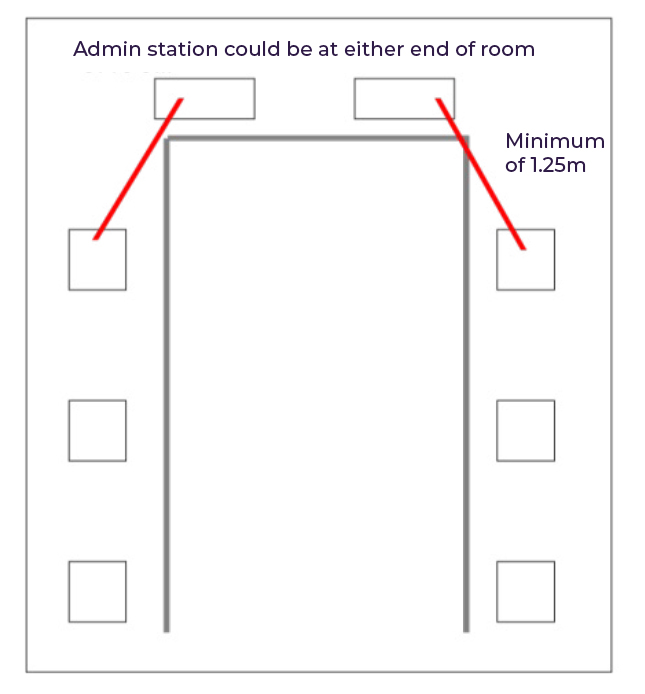
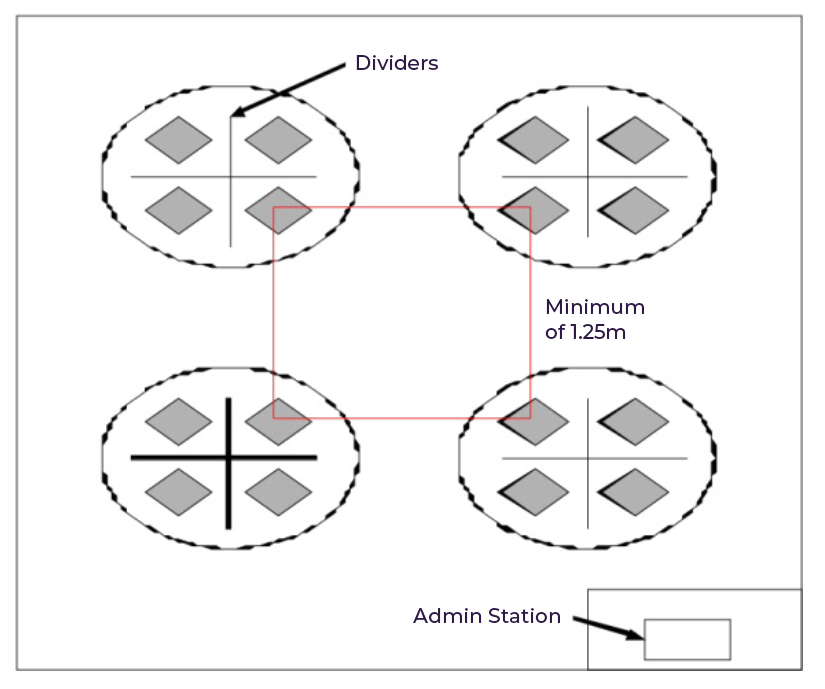
24.2 It is advised that the workstations are isolated by at least a space of 1.25m, measured from the nearest outer edge of one screen to the next, or separated by a partition. See Appendix 5 for examples of appropriate layouts.
25. ACCOMMODATION FOR ON-SCREEN ASSESSMENTS
25.1 The way in which the IT technician has installed the system will determine how many candidates can sit an assessment at one time. Spare PCs should always be available.
25.2 The assessment room must be set up with all PCs logged on and the assessment software open before candidates enter the room.
25.3 Each workstation must be tested on completion of installation of the assessment software.
25.4 The assessment time will be determined by the clock on the candidate’s PC. However, a reliable clock must be visible to each candidate when sitting in the assessment room.
25.5 Another external assessment may be held in the assessment room at the same time, provided this does not cause any disturbance. The centre must ensure that candidates are not interrupted whilst taking an assessment.
Invigilators must pay particular attention to minimising disturbance through candidates entering or leaving the assessment room whilst other candidates are still completing their assessment.
26. HARDWARE AND SOFTWARE
26.1 There must be adequate back-up provision in case of equipment failure. Provision can include:
- spare workstations (of the required specification); and,
- spares of easily replaced items (e.g. mouse, screen).
26.2 Hardware must be maintained to minimise the likelihood of failure during an assessment.
26.3 Up-to-date virus protection measures must be in place.
27. STARTING THE ASSESSMENT
27.1 In addition to the general instructions for invigilators (see chapter 20), the invigilator(s) must:
- ensure that candidates start the assessment in accordance with the specific instructions provided;
- draw candidates’ attention to the instructions on the screen at the beginning of the assessment and ask them to check that they have been provided with the correct assessment for the correct subject and level;
- inform candidates that they must not use the Exit/Finish/Quit button without first asking an invigilator;
- inform candidates to enter the required information on their screen when prompted to do so at the start of the assessment;
- inform candidates about the instruction screens that will appear prior to the start of the assessment; and,
- inform candidates that any scrap paper given to them must be returned to the invigilator at the end of the assessment and must not be taken out of the room.
28. SPECIFIC INSTRUCTIONS FOR ON-DEMAND, ON-SCREEN MATHEMATICS ASSESSMENTS
28.1 The Mathematics assessments contain a non-calculator section and a calculator section.
28.2 The non-calculator section must be completed first. Invigilators must ensure that candidates do not have access to a calculator while completing the non-calculator section.
28.3 Candidates are permitted to move on to the calculator section when they are ready to do so but cannot return to the non-calculator section once they have exited it.
28.4 Candidates should be encouraged to use the on-screen calculator, where available, within the on-screen assessment4. This avoids the possibility of transcription errors and ensures all workings are shown to fully access the available marks. However, candidates may use their own calculators if they wish.
29 EMERGENCIES AND TECHNICAL PROBLEMS
29.1 The assessment may be paused while candidates are out of the room and then restarted when they return. If the technical issue cannot be immediately resolved, then the on-screen assessment should be abandoned. A further set of on-screen assessments must be scheduled when the fault has been rectified and the system tested.
29.2 If there are difficulties with individual PCs or the whole centre system during the assessment and the failure cannot be rectified within 30 minutes, then the on-screen assessment should be abandoned. A further set of on-screen assessments should be scheduled when the fault has been rectified and the system tested.
29.3 If the system is not up and running successfully at the scheduled start time, the assessment should be delayed by no more than 15 minutes for the problem to be resolved. After this time, the on-screen assessment should be rescheduled when the fault has been rectified and the system tested.
29.4 Where a candidate is present for an on-screen assessment but is disadvantaged for any reason, the relevant awarding body’s special consideration policy should be referred to.
FINISHING THE ASSESSMENT
30.1 The assessment will close down either when the allocated time has elapsed or when the candidate completes the assessment earlier than the allocated time.
30.2 The centre must keep all evidence of attendance sheets that are produced at the end of the assessment for every candidate present. These are to be used as proof of attendance and must be stored in the centre for three months after the assessment. These may be requested at any time during this period by the awarding body.
30.3 Any scrap paper used by candidates during the assessment must be collected by the invigilator and securely destroyed. Candidates must not take any notes out of the room at the end of the assessment.
30.4 All assessments must be uploaded to the awarding body. If an assessment is not uploaded, it will not be marked and the candidate will not receive a result.
31. LEAVING THE ASSESSMENT ROOM
31.1 Candidates who have completed the assessment may leave the room at the discretion of the invigilator, subject to ensuring that no disturbance is caused to other candidates. The invigilator must turn off the computer screens to ensure other candidates cannot see them. The candidates must not be allowed back into the room.
Appendix 1: Warning to candidates

Warning to Candidates 2025
Appendix 2 –
Unauthorised items poster

No unauthorised items
Appendix 3: Checklist for invigilators (paper-based assessments)
| A Arranging the assessment room | ||||
| 1 | Check that any charts, diagrams, etc. have been cleared from the walls. | |||
| 2 | Check that desks are 1.25m apart and each candidate has a separate desk of sufficient size to accommodate the question paper. | |||
| 3 | Check that you have the following on display in the assessment room: • a clock that all candidates can see clearly while seated; • a board or display showing the: – centre number; – subject title; – paper number; and, – actual start and finish time of the assessment. | |||
| 4 | Check that you have the following on display outside the assessment room: • JCQ Warning to Candidates poster; • JCQ Unauthorised items poster. | |||
| 5 | Check that you have for the main assessment room: • a copy of the current JCQ document Instructions for conducting examinations; • a copy of the current JCQ document Instructions for conducting Functional Skills assessments; • any subject-specific instructions and/or stationery lists issued by the awarding body; • a seating plan. | |||
| 6 | Check that heating, lighting, ventilation and the level of outside noise is acceptable throughout the assessment. | |||
| 7 | Check that emergency exits and fire routes are unobstructed. | |||
| B Access arrangements | ||||
| 1 | Check in advance with the exams officer which candidates, if any, have been granted access arrangements. | |||
| C Use of calculators and dictionaries | ||||
| 1 | Candidates are allowed to use calculators, unless the question paper says otherwise. | |||
| 2 | Candidates are allowed to use dictionaries in all Functional Skills assessments except English Writing assessments. | |||
| 3 | Candidates are allowed to use bilingual dictionaries in all Functional Skills assessments except English Writing assessments. | |||
| D Identifying candidates | ||||
| 1 | Make sure you know the identity of every candidate in the assessment room. | |||
| 2 | Check the identification documents provided by candidates who are not known to the centre. Make sure they are the same people who were entered or registered for the assessment. | |||
| E Before the assessment | ||||
| 1 | Check that there are sufficient invigilators for the number of candidates taking the assessment. | |||
| 2 | Check the front of the question paper regarding authorised materials, particularly calculators or dictionaries (see C above). | |||
| 3 | Brief candidates about the regulations for taking the assessment; reading out instructions and warnings to candidates. | |||
| 4 | Warn candidates that they must give you any unauthorised items, including technological or web-enabled potential sources of information, such as: • earphones or earbuds (e.g. AirPods); • mobile phones; • MP3/4 players or similar devices; • smart glasses; • tablets (e.g. iPads or iPods); • watches; and, any other smart devices. | |||
| 5 | Tell the candidates to: fill in the details on the front of their answer booklet and any supplementary sheets, e.g. candidate name, centre number, registration number; and, read the instructions on the front of the question paper. | |||
| 6 | Tell the candidates about any erratum notices. | |||
| 7 | Remind candidates: • to write in black ink; and, • not to use highlighters or gel pens in their answers. | |||
| 8 | Remind candidates to write in the designated sections of the answer booklet. | |||
| 9 | Tell candidates when they may begin the assessment and how much time they have. | |||
| F During the assessment | ||||
| 1 | Accurately complete the attendance register. | |||
| 2 | Deal with any late arriving candidates (see section 21 of the JCQ document Instructions for conducting examinations). | |||
| 3 | Supervise the candidates at all times to prevent cheating and distractions. | |||
| 4 | Do not give any information to candidates about: • suspected mistakes in the question paper unless the awarding body has issued an erratum notice or given permission; • any question on the paper or the requirements for answering particular questions. | |||
| 5 | If a candidate wishes to leave the assessment room, see section 23 of the JCQ document Instructions for conducting examinations. Make sure that an appropriate member of staff is available to accompany any candidate who needs to leave the room temporarily. | |||
| 6 | Make sure that a question paper is not removed from the room during the assessment. | |||
| 7 | In an emergency, follow the procedures in section 19 of the JCQ document Instructions for conducting Functional Skills assessments and any centre specific instructions. | |||
| 8 | Remind candidates when there are only five minutes of the assessment remaining. | |||
| 9 | Tell candidates to stop writing at the end of the assessment. | |||
| G After the assessment | ||||
| 1 | Check and sign the attendance register. | |||
| 2 | Tell candidates to check that they have: • written all the necessary information on their answer booklet, including any supplementary sheets; • crossed out rough work or unwanted answers; • fastened any supplementary sheets, as instructed on the question paper/answer booklet. | |||
| 3 | Collect all scripts and all unused stationery before candidates leave the room. | |||
| 4 | Arrange scripts in the order candidates appear on the attendance register. | |||
| 5 | Make sure that scripts are stored securely before they are despatched to the awarding body or the examiner. | |||
| 6 | If candidates are required to print work off outside the time allowed for the assessment, ensure candidates are supervised at all times. | |||
Appendix 4 – Checklist for invigilators (on-screen assessments)
| A Arranging the assessment room | ||||
| 1 | Check that any charts, diagrams, etc. have been cleared from the walls. | |||
| 2 | Check that desks are 1.25m apart and each candidate has a separate desk of sufficient size to accommodate the question paper. | |||
| 3 | Check that you have the following on display in the assessment room: • a clock that all candidates can see clearly while seated; • a board or display showing the: – centre number; – start and finish time of the assessment. | |||
| 4 | Check that you have the following on display outside the assessment room: • JCQ Warning to Candidates poster; • JCQ Unauthorised items poster. | |||
| 5 | Check that you have: • a copy of the current JCQ document Instructions for conducting examinations; • a copy of the current JCQ document Instructions for conducting Functional Skills assessments; • any subject-specific instructions and/or stationery lists issued by the awarding body; • a seating plan of the assessment room. | |||
| 6 | Check that sufficient workstations are available, including at least one replacement computer, and printers where required. | |||
| 7 | Where candidates are required to print their responses, ensure sufficient stocks of toner, ink and paper. | |||
| 8 | Check that heating, lighting, ventilation and the level of outside noise is acceptable throughout the assessment. | |||
| 9 | Check that emergency exits and fire routes are unobstructed. | |||
| B Access arrangements | ||||
| 1 | Check in advance with the exams officer which candidates, if any, have been granted access arrangements. | |||
| C Use of calculators and dictionaries | ||||
| 1 | Candidates are allowed to use calculators, unless the on-screen assessment says otherwise. It is recommended that candidates use the on-screen calculator where provided within the assessment software. | |||
| 2 | Candidates are allowed to use dictionaries in Functional Skills assessments except English Writing assessments. | |||
| 3 | Candidates are allowed to use bilingual dictionaries in all Functional Skills assessments except English Writing assessments. | |||
| D Identifying candidates | ||||
| 1 | Check the identity of each candidate. | |||
| 2 | Check the correct ID and password are issued to each candidate sitting the assessment. Oversee the input of the ID and password for each candidate. Check that the name on the computer screen matches the name of the candidate. | |||
| E Before the assessment | ||||
| 1 | Check that there are sufficient invigilators for the number of candidates taking the assessment. | |||
| 2 | Ensure that candidates are seated comfortably, in their designated seat, with access to any assistive technology (if required) where approved by the awarding body. | |||
| 3 | Brief candidates about the regulations for taking the assessment, reading out instructions and warnings to candidates. | |||
| 4 | Warn candidates that they must give you any unauthorised items, including potential technological or web-enabled sources of information, such as: • earphones or earbuds (e.g. AirPods); • mobile phones; • MP3/4 players or similar devices; • smart glasses; • tablets (e.g. iPads or iPods); • watches; and, any other smart devices. | |||
| 5 | Tell the candidates to read the instructions at the start of the on-screen assessment. | |||
| 6 | Tell the candidates about any erratum notices. | |||
| 7 | Make sure that candidates are familiar with the instructions, procedures and regulations for the on-screen assessment, particularly on how to navigate and respond on-screen. | |||
| 8 | Remind candidates when they may begin and how the assessment will end. | |||
| 9 | Check that candidates know how to request technical assistance. | |||
| 10 | Check that all candidates have logged on successfully or have been logged on by the centre. | |||
| 11 | Ensure that technical support to deal with malfunctioning equipment or software is available throughout the on-screen assessment. | |||
| F During the assessment | ||||
| 1 | Accurately complete the attendance register, whether supplied in hard copy paper format or online. | |||
| 2 | Deal with any late arriving candidates (see section 21 of the JCQ document Instructions for conducting examinations). | |||
| 3 | Supervise the candidates at all times, including any planned or unplanned breaks, to prevent cheating and distractions. | |||
| 4 | Do not give any information to candidates about a specific question or the requirements for answering particular questions. | |||
| 5 | Make sure that you are aware of the requirements for supervising candidates. | |||
| 6 | Make sure that an appropriate member of staff is available to accompany any candidate who needs to leave the room temporarily. | |||
| 7 | In an emergency, follow the procedures in section 19 of the JCQ document Instructions for conducting Functional Skills assessments and any centre specific instructions. | |||
| 8 | Record and report to the awarding body any complaints from candidates relating to system delays or any other IT irregularities. | |||
| G After the assessment | ||||
| 1 | Check and sign the attendance register where supplied in hard copy paper format. | |||
| 2 | Supervise the conclusion of the assessment, ensuring that candidates’ responses are saved and secure from unauthorised access. | |||
| 3 | Ensure that the software is closed as necessary. | |||
| 4 | Check that any necessary back-ups have been made and stored securely. | |||
| 5 | Collect copies of candidates’ work, additional printouts and question papers before candidates leave the room. | |||
| 6 | Remove candidates’ user areas at the end of the assessment window or after each session, if feasible. | |||
Appendix 5 – General environment and layout of the assessment room – examples
- All NCFE audits are unannounced irrespective of the mode of delivery. ↩︎
- For NCFE assessments the answer booklet will be pre-populated with the candidate’s details. ↩︎
- NCFE does not provide separate source documents and text booklets for Level 2 English Reading assessments. ↩︎
- NCFE online assessments do not have an on-screen calculator. Candidates are advised to use a physical calculator. ↩︎